


Vidmud is an all-in-one AI platform that helps users create, enhance, and edit images and videos in seconds. Whether you prefer a cloud-based experience or local processing on Windows, Vidmud provides powerful AI tools. Users can easily produce impressive visual content without any need for prior production or editing experience, and the outcomes can stand alongside work created by professionals. Learn from this guide to know more information.
Vidmud is available as both an online service and a Windows desktop application, allowing users to choose the experience that best fits their workflow.
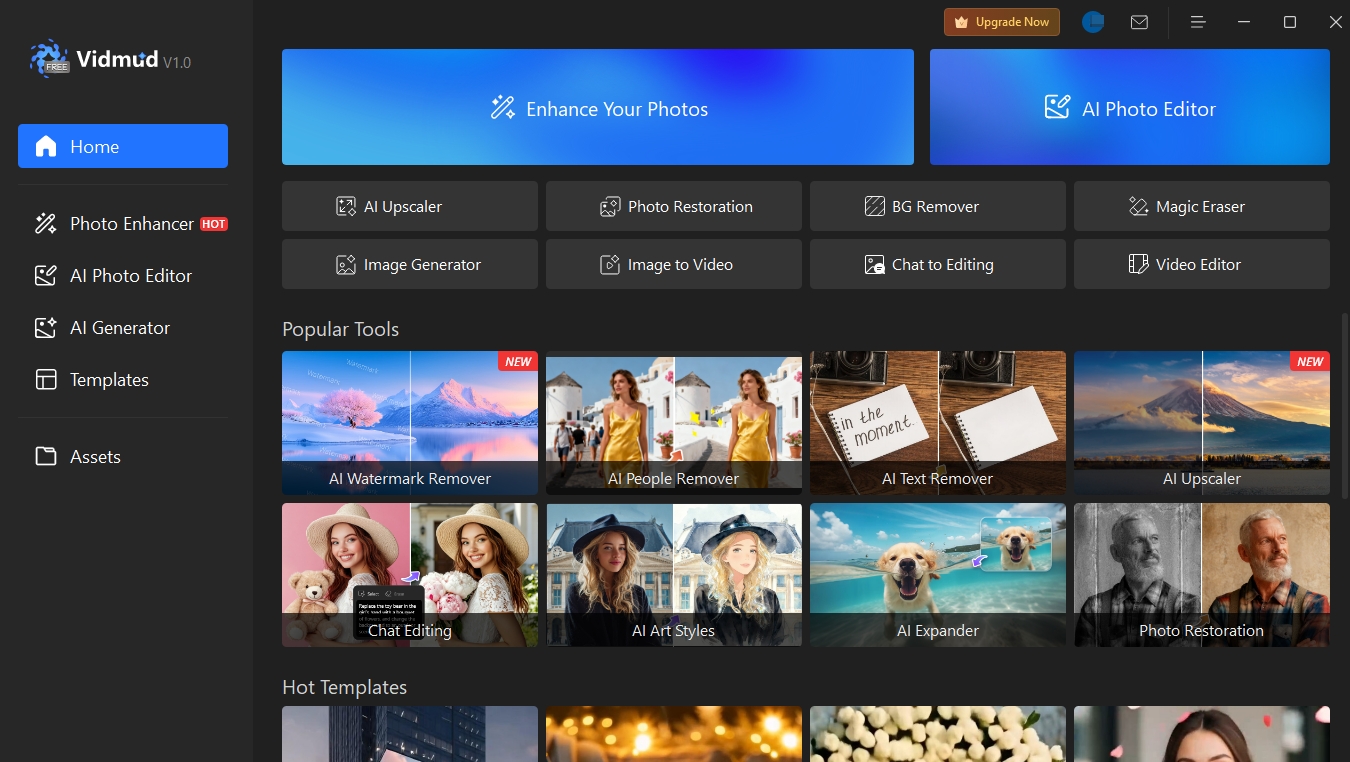
Vidmud AI Studio (Windows Desktop Software)
The Vidmud Windows desktop software version is called Vidmud AI Studio. Vidmud AI Studio brings most of Vidmud's powerful AI tools directly to your Windows desktop, while adding local processing capabilities for enhanced privacy, faster performance, and offline accessibility. Vidmud AI Studio not only delivers outstanding performance but also features a remarkably intuitive and user-friendly interface that makes navigation a breeze.
| Feature |
Vidmud Online Version |
Vidmud AI Studio |
|
AI Photo Enhancer |
✓ | ✓ |
|
AI Video Enhancer |
✓ |
Coming soon |
|
AI Photo Editor |
✓ | ✓ |
|
Image to Video AI |
✓ | ✓ |
|
AI Image Generator |
✓ | ✓ |
|
Local Processing |
✗ | ✓ |
|
Faster Processing |
✗ | ✓ |
|
Batch Processing |
✗ |
Coming soon |
|
Unlimited Free Use |
Limited Free Use |
✓ |
With Vidmud AI Studio, users can enhance photos, generate AI artwork, edit images, and create videos from images directly on their Windows PC. By running locally, Vidmud AI Studio provides a smooth and responsive experience while giving users greater control over their creative workflow.
Why Choose Vidmud AI Studio?
Vidmud AI Studio provides the following benefits:
Local Processing – Process images directly on your device for enhanced privacy and control.
No Cloud Dependency – Work without relying on continuous internet connectivity.
Faster Workflow – Enjoy responsive performance without waiting for cloud queues.
User-Friendly Interface – Powerful AI tools designed for users of all skill levels.
All-in-One Creative Suite – Generate, edit, enhance, and transform visuals from a single desktop application.
Vidmud Online Version
Vidmud online version includes a comprehensive collection of powerful integrated features, such as the following:
Vidmud AI Photo Enhancer is a tool that leverages AI technology to improve visual quality by carefully enhancing every detail. It can sharpen edges, reduce noise and grain, correct colors, and more, helping your photos become clearer and more visually appealing.
Vidmud AI Video Enhancer is free, accessible online, and does not require any sign-up, which makes it well worth considering. It allows you to enjoy 4K upscaling directly in your browser, with no watermarks and no storage of your files.
Vidmud AI Photo Editor allows users to effortlessly enhance, edit, and transform images using simple text prompts. Powered by advanced technologies including generative AI, machine learning, and object recognition, it intelligently understands user instructions and delivers high-quality edits in real time.
Vidmud's AI Image-to-Video Generator brings your photos to life. It turns static images into captivating, realistic videos in seconds with a simple upload. Designed to be easy, secure, and accessible, Vidmud requires no editing experience, no account creation, and no complicated setup—just upload your photo and watch it transform into a dynamic visual story.
Vidmud AI Image Generator allows users to create high-quality AI-generated images from text prompts or photos in seconds. Generate a wide range of visuals, including realistic portraits, product photos, anime-style artwork, and creative landscapes. No sign-up, no watermarks, and no design experience required.
Vidmud ID Photo Maker
Vidmud AI Image Describer
Vidmud AI Image Combiner
Vidmud AI Baby Generator
More AI-powered tools are available and continue to be added.
Ready to start creating? Try Vidmud Online instantly in your browser, or download Vidmud AI Studio for powerful local AI processing on Windows.